How to download TikTok videos

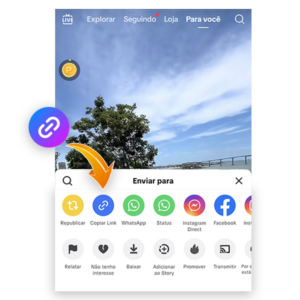
Screenshot showing how to copy a TikTok video link.

1. Copy the link

Open the TikTok video you want to download, tap Share, and select Copy link.

2. Paste the link

Paste the copied link into the field on Baixador.com and click Download.
Screen showing where to insert the post link for media download.
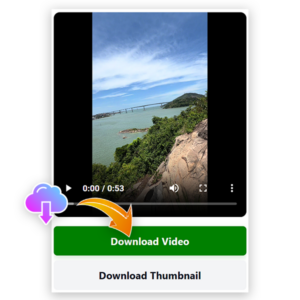
Screenshot showing how to select and download the video from TikTok.

3. Select and download

When the video is available, click the download button to download it.

4. Check your gallery

The downloaded file will automatically appear in your device’s Downloads folder or gallery.
Illustrative image of the media downloaded to the gallery.
Illustrative image showing the types of posts that can be downloaded.

Download TikTok video in high quality

Baixador.com was built to download TikTok video fast, with great quality and zero hassle.

Paste the TikTok link in the field above and download the video directly to your phone or computer.

With one click, you can save public videos to organize references, study trends, and archive important content — keeping the best available quality.

Compatible with Android, iPhone, tablets, and computers, Baixador.com offers a simple, quick, and safe way to download TikTok videos.

What can you download?

On Baixador.com you can download TikTok video content that is publicly available, in the best quality possible (and without a watermark when available).

You can also download Instagram videos and Reels, as well as Facebook videos, to keep everything organized in one place.

These extra tools complement TikTok downloads and make archiving public content easier.

Why use Baixador.com?

  • Ideal for downloading TikTok video in high quality.
  • Unlimited downloads.
  • No watermark.
  • Works on phone, tablet, and computer.
  • No app or extension required.
  • 100% free and online.
  • Simple interface: paste the link and download.
  • Media preserved in the best possible quality.
  • Available 24/7, seven days a week.

Frequently asked questions

Simply copy the TikTok video link, paste it into Baixador.com, and click “download.” The video will be saved without the official TikTok watermark.
Yes! Baixador.com is 100% safe. No personal information is requested, and downloads are done directly through the browser.
Yes. The tool works perfectly on Android and iPhone (iOS). Just paste the link and download the video in seconds.
No. You can download TikTok videos using only your browser — no installation needed.
No. You only need the public link of the video. No login or account is required.
Yes. If the video was posted with music, it will download normally with the audio.
Videos are usually saved in the “Downloads” folder on your phone or computer.

© 2025 All rights reserved. Privacy Policy | Terms of Use